> ## Documentation Index
> Fetch the complete documentation index at: https://help.teable.ai/llms.txt
> Use this file to discover all available pages before exploring further.
# Overview
> Create, import, share, and manage tables in a base.
Each base can contain multiple tables for storing and managing related data. Teable tables are equivalent to database tables — understanding [how they differ from spreadsheets](/en/compare/teable-vs-excel) will help you get the most out of Teable.
## Create and Manage Tables
### Adding Tables
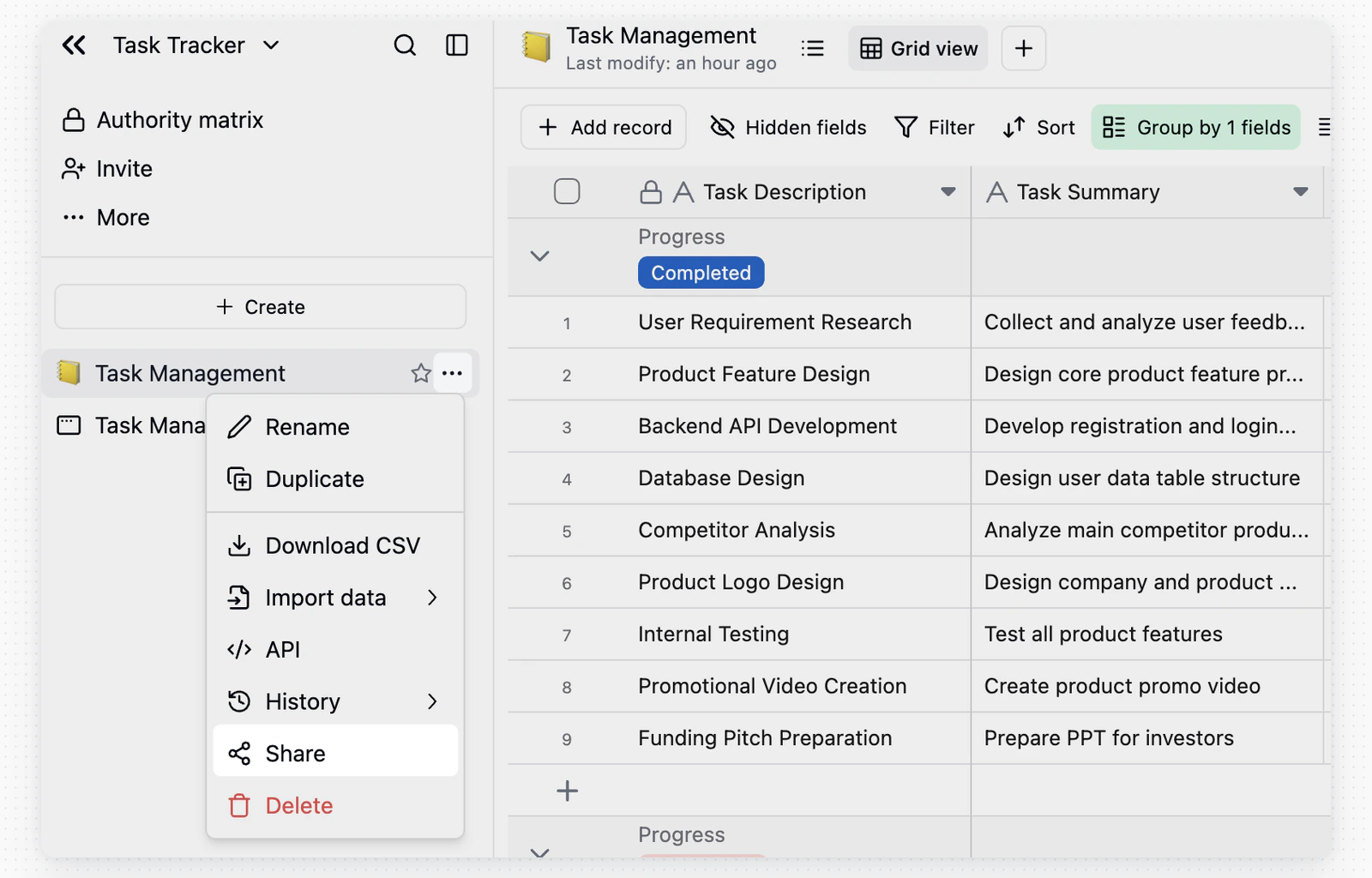
In a base, click the `+` button in the directory and choose to:
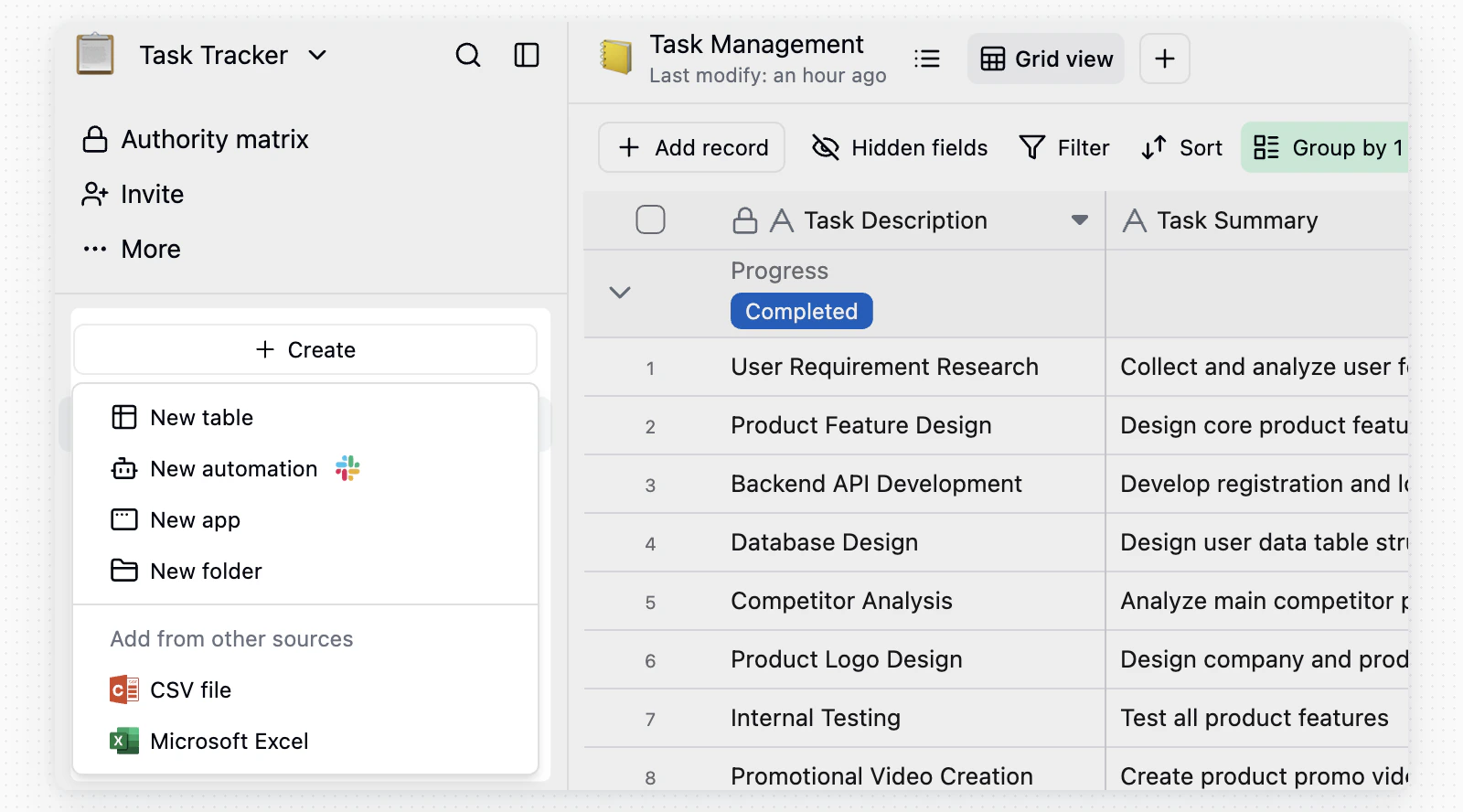 1. Create a new blank table
2. Import from a CSV file
3. Import from an Excel file
4. Import from Airtable, if Airtable integration is configured
See the [Import section](/en/basic/table/import) for details.
### Renaming & Deleting
* **Rename**: Double-click the table name in the directory, edit it, then click anywhere outside to save.
* **Delete**: Hover over the table in the directory, click `...`, then select **Delete**.
1. Create a new blank table
2. Import from a CSV file
3. Import from an Excel file
4. Import from Airtable, if Airtable integration is configured
See the [Import section](/en/basic/table/import) for details.
### Renaming & Deleting
* **Rename**: Double-click the table name in the directory, edit it, then click anywhere outside to save.
* **Delete**: Hover over the table in the directory, click `...`, then select **Delete**.
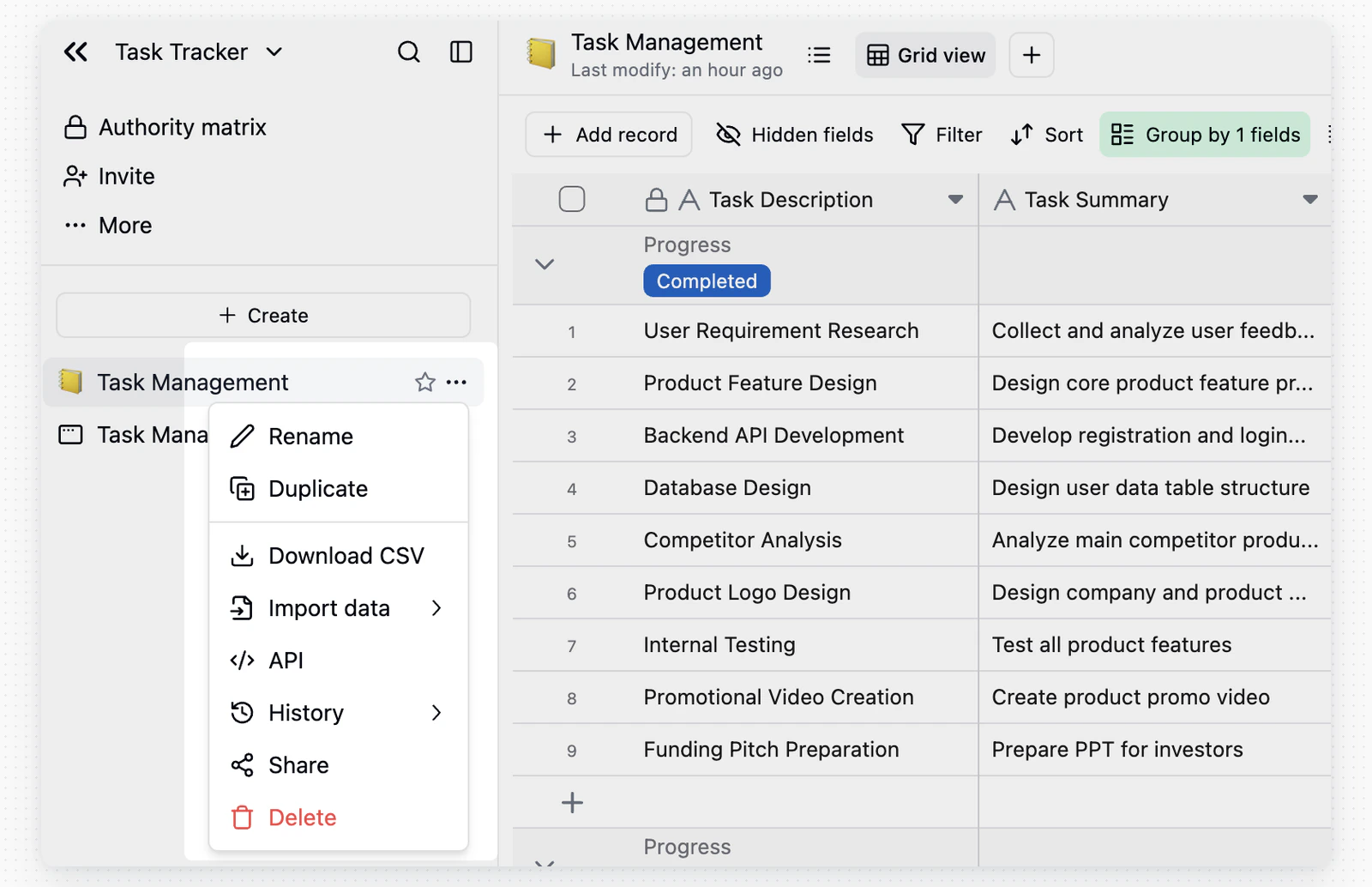 When other tables link to the table you are deleting, the confirmation dialog lists the fields the delete affects, with the Base and table each one belongs to. Deleting the table converts those link fields into single line text fields that keep the linked record titles, and lookup or rollup fields built on them stop working.
### Trash
Click the trash icon in the upper left of the base to manage deleted tables.
When other tables link to the table you are deleting, the confirmation dialog lists the fields the delete affects, with the Base and table each one belongs to. Deleting the table converts those link fields into single line text fields that keep the linked record titles, and lookup or rollup fields built on them stop working.
### Trash
Click the trash icon in the upper left of the base to manage deleted tables.
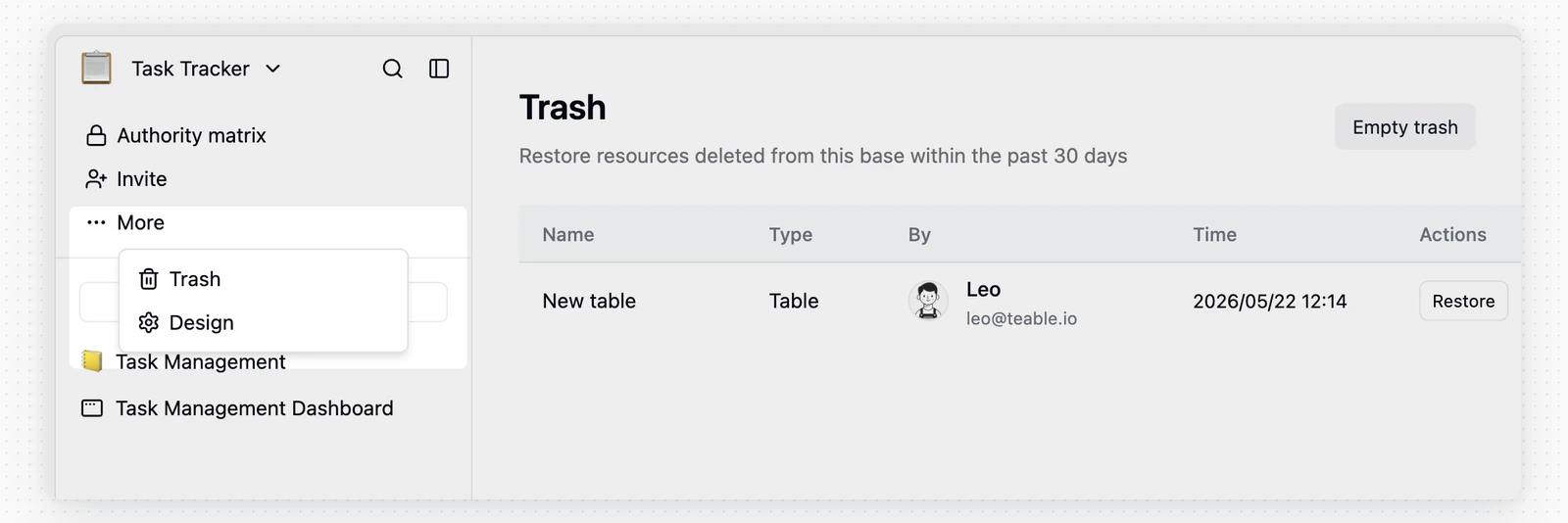 * **Restore**: Bring the table back to the base with all data intact
* **Empty trash**: Permanently delete all trashed tables
Restoring a table does not undo the link conversion. Link fields in other tables stay text, so recreate them if you need the connection back.
## Design Tables
Click **Design** in the table menu to view the table's basic properties:
* **Restore**: Bring the table back to the base with all data intact
* **Empty trash**: Permanently delete all trashed tables
Restoring a table does not undo the link conversion. Link fields in other tables stay text, so recreate them if you need the connection back.
## Design Tables
Click **Design** in the table menu to view the table's basic properties:
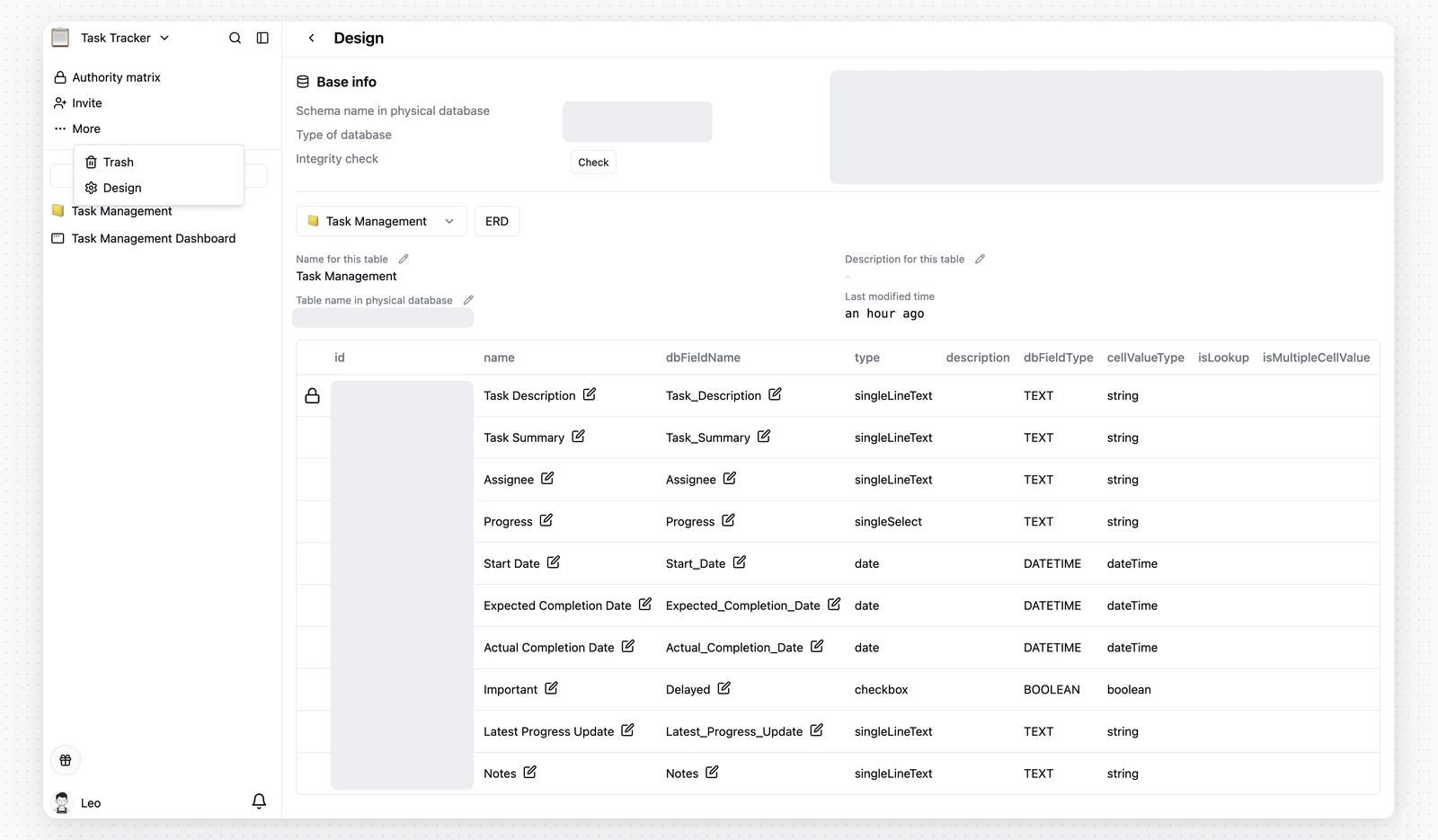 **Table Information**
Schema, physical table name, description, and last modified time
**Field Properties**
| Property | Description |
| :---------------------- | :---------------------------------------------------------------------------------- |
| **id** | Field ID |
| **name** | Field name |
| **dbFieldName** | Field name in the physical database |
| **type** | Field type |
| **description** | Field description |
| **graph** | View current field dependencies |
| **cellValueType** | Current field value type |
| **isLookup** | Whether it's a field looked up from a linked table |
| **isMultipleCellValue** | Whether it's an [array value field](/en/basic/field/common/is-multiple-value) |
| **isComputed** | Whether it's a computed field (record values of computed fields cannot be modified) |
| **isPending** | Whether it's in calculation |
| **hasError** | Whether there are calculation errors |
| **notNull** | Whether non-null validation is enabled |
| **unique** | Whether unique value validation is enabled |
## Share and Access Tables
### Share a Table
In a table, click **Share** in the upper-right corner, switch to **Share table**, and turn on **Share to web** to generate a share link.
**Table Information**
Schema, physical table name, description, and last modified time
**Field Properties**
| Property | Description |
| :---------------------- | :---------------------------------------------------------------------------------- |
| **id** | Field ID |
| **name** | Field name |
| **dbFieldName** | Field name in the physical database |
| **type** | Field type |
| **description** | Field description |
| **graph** | View current field dependencies |
| **cellValueType** | Current field value type |
| **isLookup** | Whether it's a field looked up from a linked table |
| **isMultipleCellValue** | Whether it's an [array value field](/en/basic/field/common/is-multiple-value) |
| **isComputed** | Whether it's a computed field (record values of computed fields cannot be modified) |
| **isPending** | Whether it's in calculation |
| **hasError** | Whether there are calculation errors |
| **notNull** | Whether non-null validation is enabled |
| **unique** | Whether unique value validation is enabled |
## Share and Access Tables
### Share a Table
In a table, click **Share** in the upper-right corner, switch to **Share table**, and turn on **Share to web** to generate a share link.
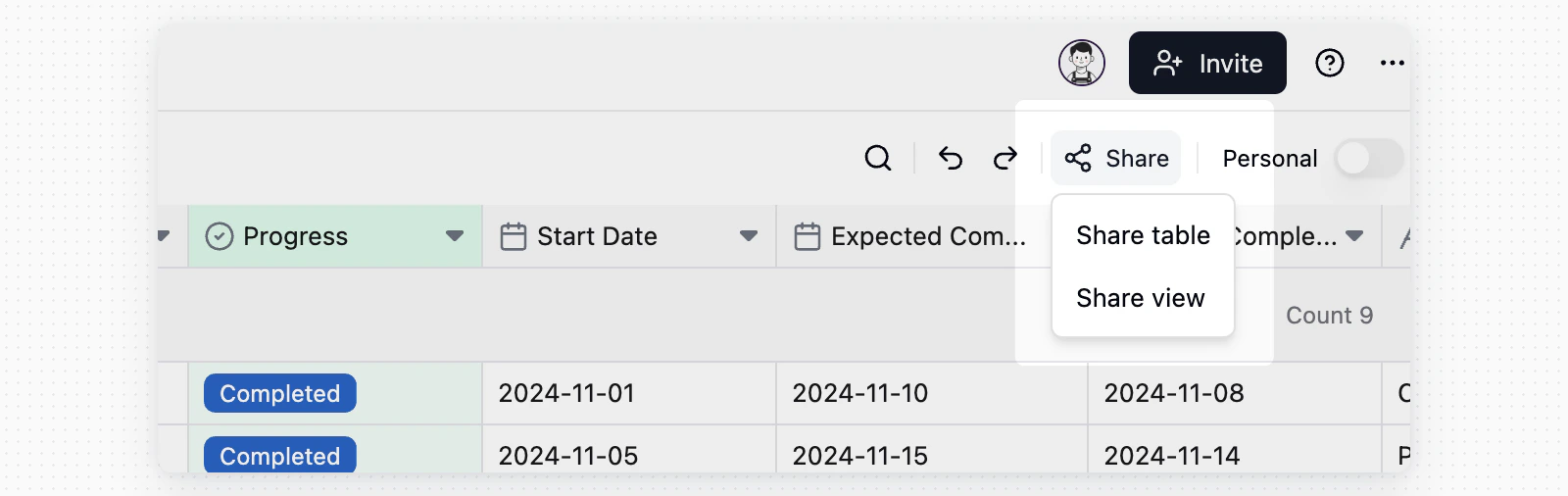 After table sharing is enabled, the **Share** button appears in a gray shared state in every view in that table. This state comes from table sharing; it does not mean each view has been shared separately.
Link permissions:
After table sharing is enabled, the **Share** button appears in a gray shared state in every view in that table. This state comes from table sharing; it does not mean each view has been shared separately.
Link permissions:
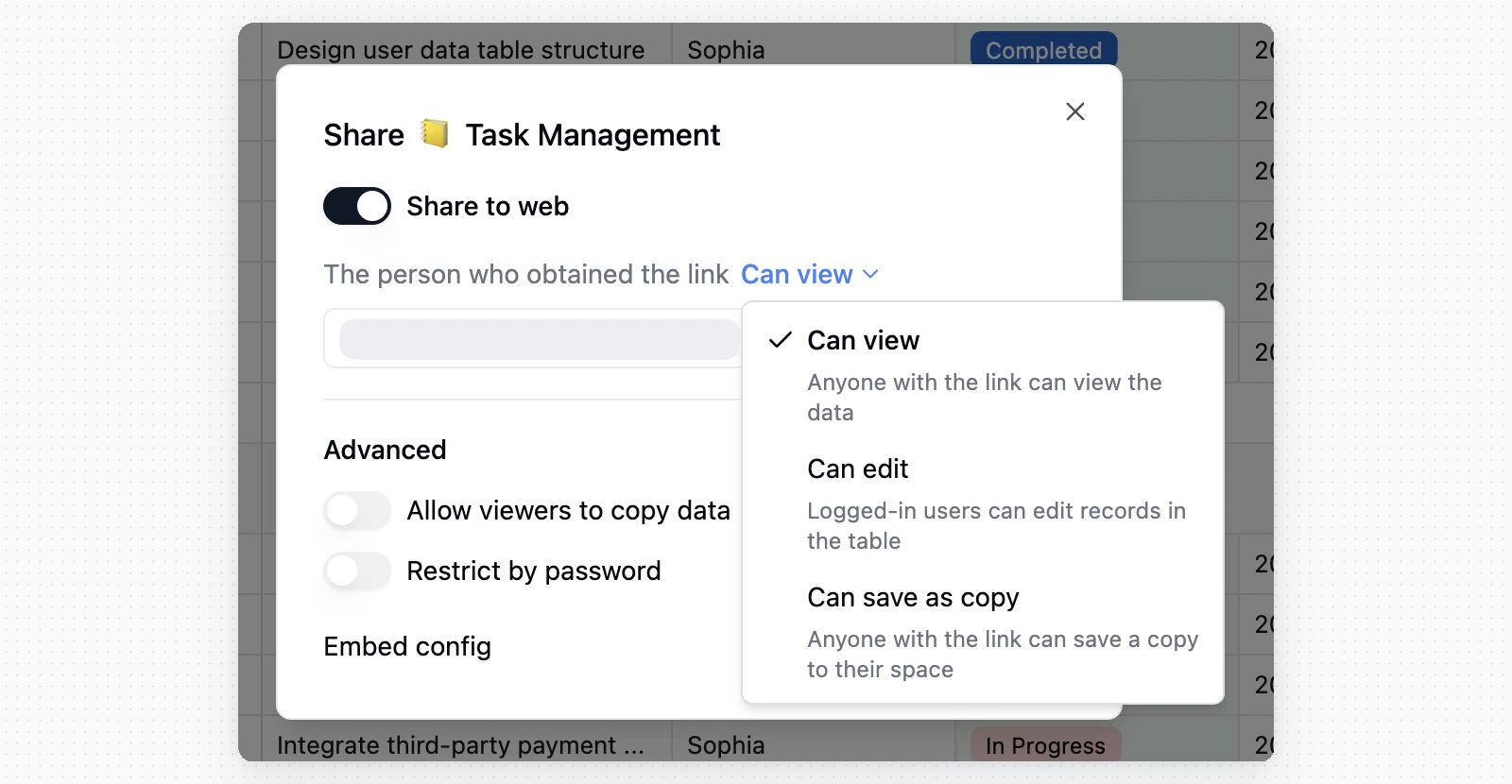 * **Can view**: Anyone with the link can view table data
* **Can edit**: Logged-in users can edit records in the shared table
* **Can save as copy**: Anyone with the link can save a copy to their space
You can also configure **Allow viewers to copy data**, **Restrict by password**, regenerate or delete the link, and copy the embed config.
To share only the current view, switch to **Share view**. For details, see [View toolbar](/en/basic/view/toolbar).
### Ways to Access Tables
Tables default to a [Grid view](/en/basic/view/grid) and are also accessible via the [API](/en/api-doc/overview). You can create additional views — such as Kanban — to suit different workflow needs.
## Search and Downloads
### Global Search
* **Can view**: Anyone with the link can view table data
* **Can edit**: Logged-in users can edit records in the shared table
* **Can save as copy**: Anyone with the link can save a copy to their space
You can also configure **Allow viewers to copy data**, **Restrict by password**, regenerate or delete the link, and copy the embed config.
To share only the current view, switch to **Share view**. For details, see [View toolbar](/en/basic/view/toolbar).
### Ways to Access Tables
Tables default to a [Grid view](/en/basic/view/grid) and are also accessible via the [API](/en/api-doc/overview). You can create additional views — such as Kanban — to suit different workflow needs.
## Search and Downloads
### Global Search
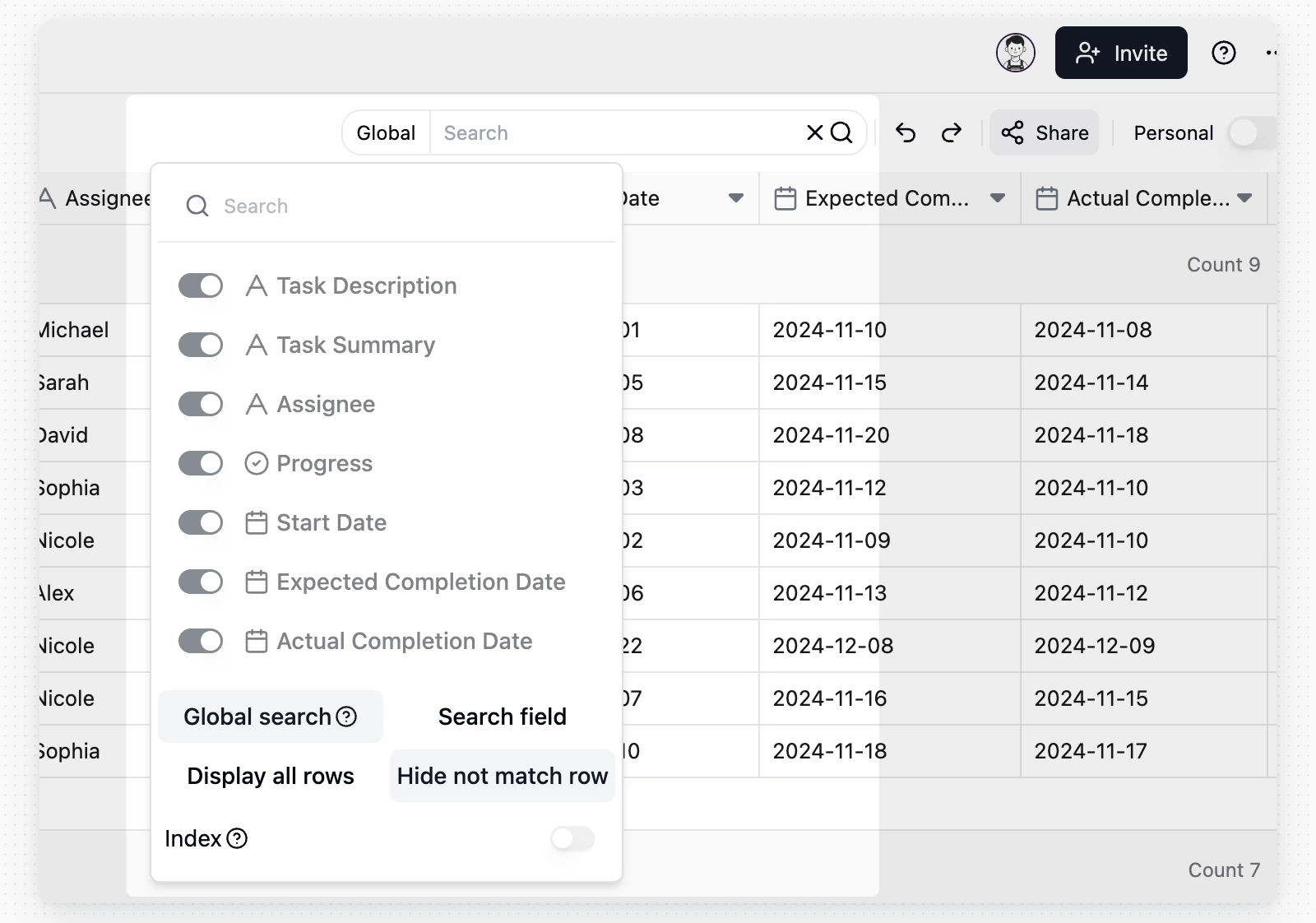 * Turn on **Search field** to choose which fields to search. This mode supports date fields in addition to text fields.
* Turn off **Search field** to run a fuzzy search across all supported fields. Global search does not include date, checkbox, or button fields. Your instance may also limit how many fields global search can cover.
* Turn on **Hide not match row** to show only matching records. Turn it off to keep all rows visible and highlight matches.
* For large tables, editors can turn on **Index** to improve search speed. Building or updating the index can temporarily affect read and write performance.
### Attachment Downloads
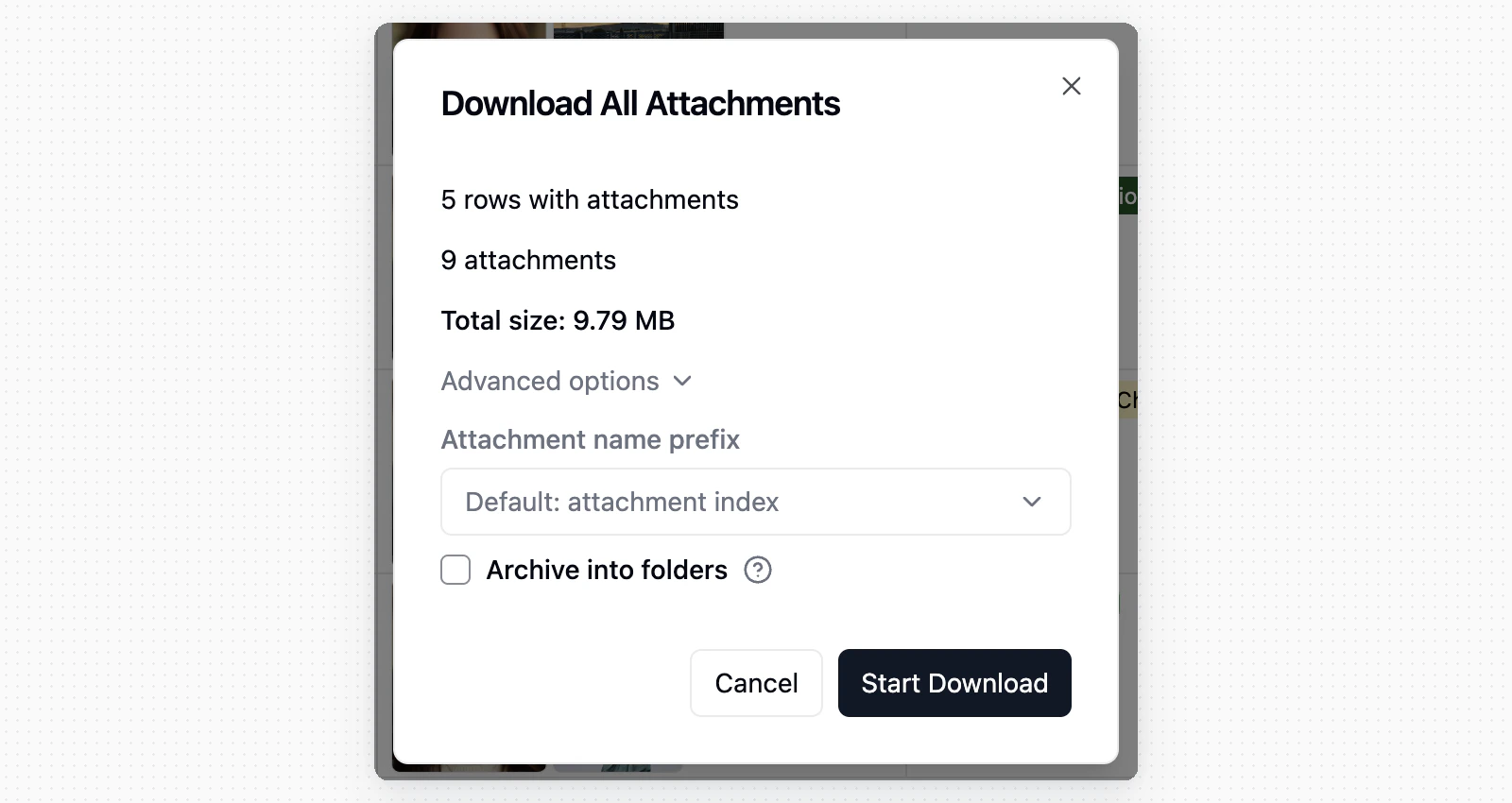
Bulk attachment downloads respect the current search results and include only attachments from matching records.
* Turn on **Search field** to choose which fields to search. This mode supports date fields in addition to text fields.
* Turn off **Search field** to run a fuzzy search across all supported fields. Global search does not include date, checkbox, or button fields. Your instance may also limit how many fields global search can cover.
* Turn on **Hide not match row** to show only matching records. Turn it off to keep all rows visible and highlight matches.
* For large tables, editors can turn on **Index** to improve search speed. Building or updating the index can temporarily affect read and write performance.
### Attachment Downloads
Bulk attachment downloads respect the current search results and include only attachments from matching records.
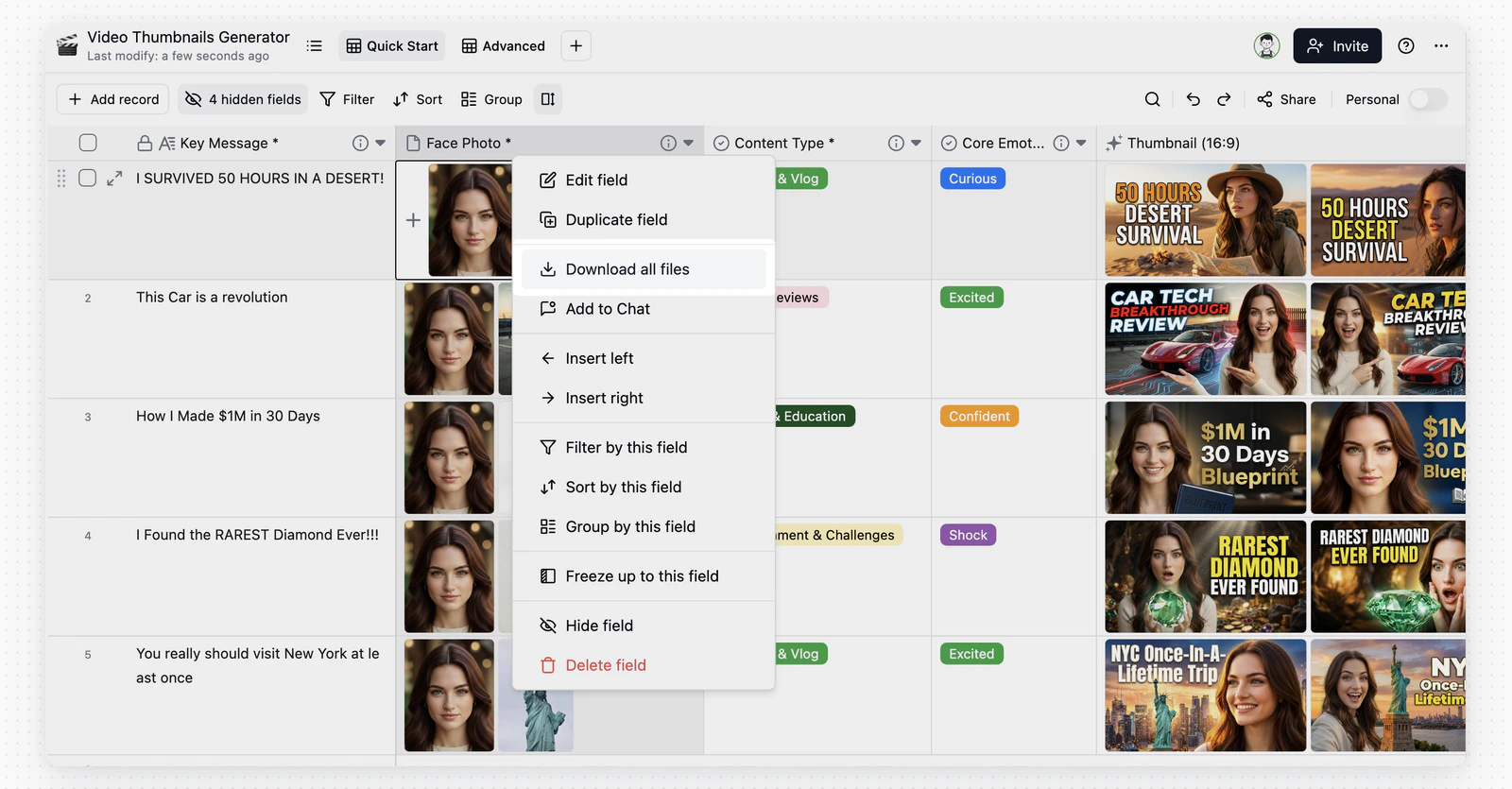 In the bulk download dialog, use **Attachment name prefix** to name ZIP files by default index, a chosen field, or **No prefix** to keep original filenames; duplicates get an auto-appended suffix.
 ## FAQ
Teable is stricter than Excel — each column has a fixed data type, and a Number column only stores numbers. This constraint ensures data integrity and is the foundation for advanced filtering and automation. See [Teable vs Excel](/en/compare/teable-vs-excel) for details.
Check whether the table is referenced by **linked fields** in other tables. Deleting the source table may cause data display issues in linked tables.
## FAQ
Teable is stricter than Excel — each column has a fixed data type, and a Number column only stores numbers. This constraint ensures data integrity and is the foundation for advanced filtering and automation. See [Teable vs Excel](/en/compare/teable-vs-excel) for details.
Check whether the table is referenced by **linked fields** in other tables. Deleting the source table may cause data display issues in linked tables.